Triaster QMS
Triaster QMS Features.
Some of the major QMS features, grouped by the four things a Quality Management System has to do well: Capture, Govern, Share and Improve. Every capability works against one connected model of how your organisation actually runs.
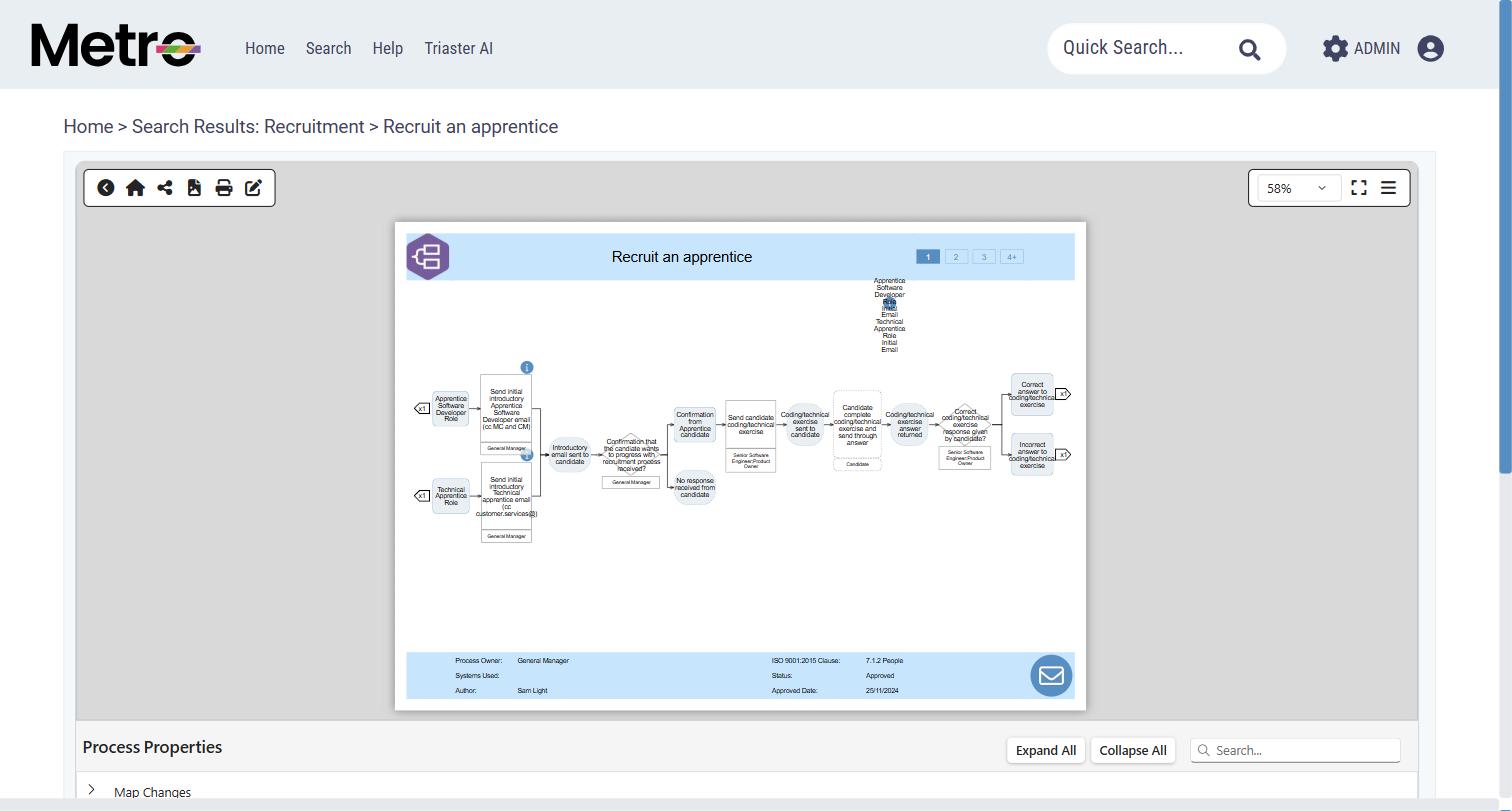
Every screenshot on this page and on the pages below is a real capture from a live Triaster library, not a mock-up.
Go deeper
Three capabilities with a page of their own.
These are the parts of the product buyers most often do not know exist. Each one is configured or enabled per organisation rather than switched on for everyone by default.
Triaster AI
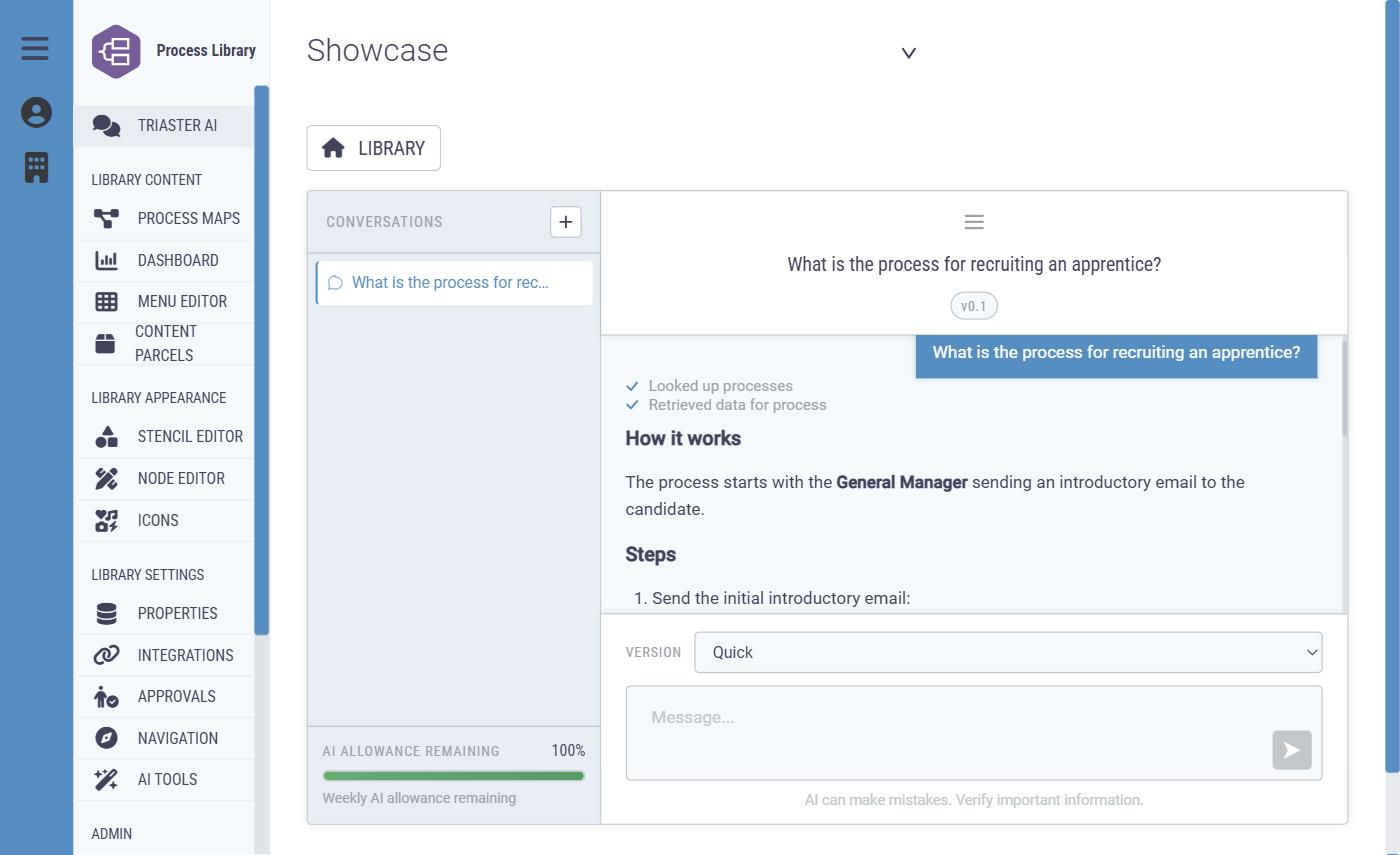
Ask questions of your own approved content, explore a process conversationally, and draft a first map from source material. Scoped to your library, not a general chatbot.
Explore Triaster AI →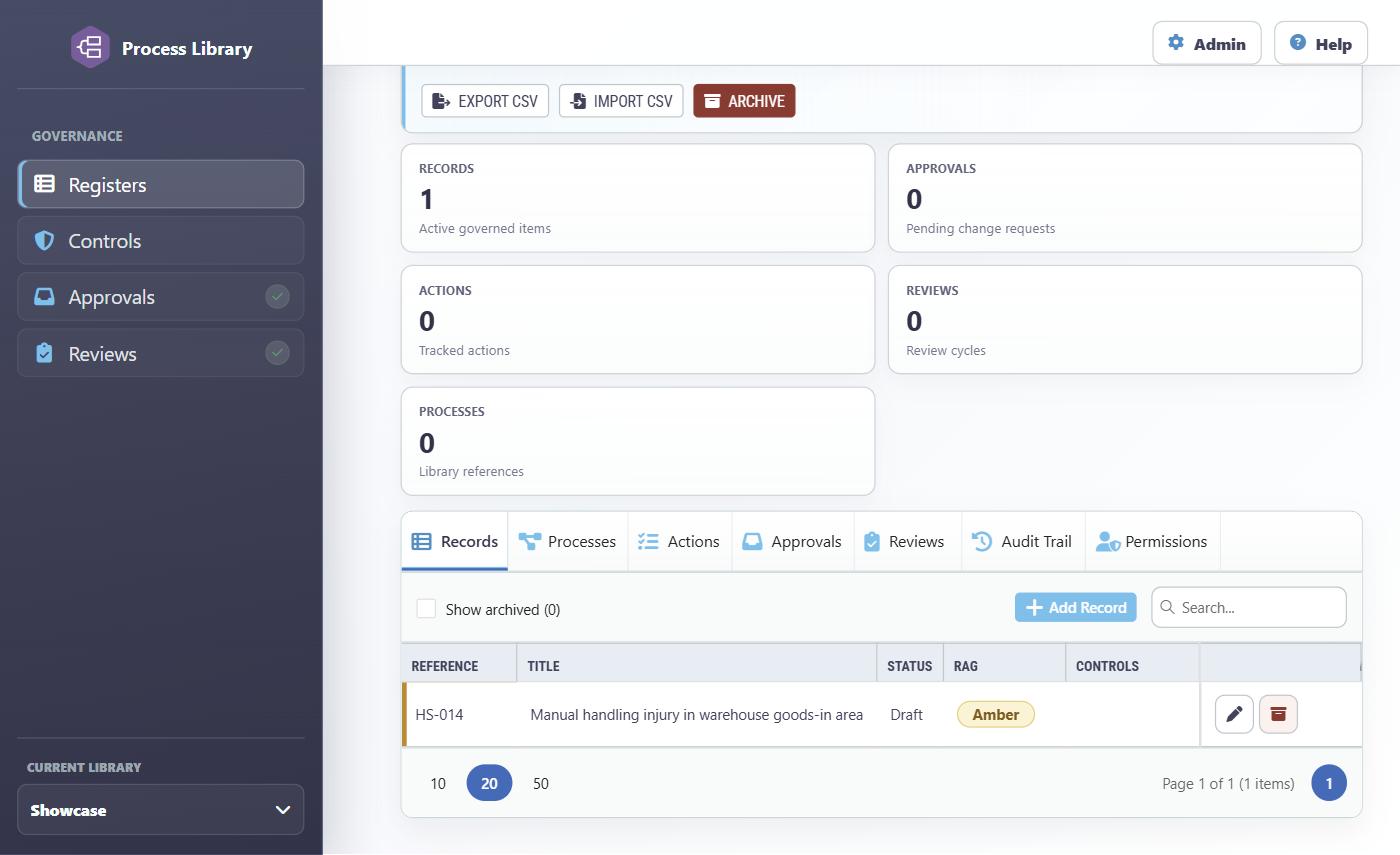
Registers
Risks, controls, actions and reviews with owners, risk scoring, RAG status, approval routes and an audit trail, linked to the processes and controls they concern.
Explore Registers →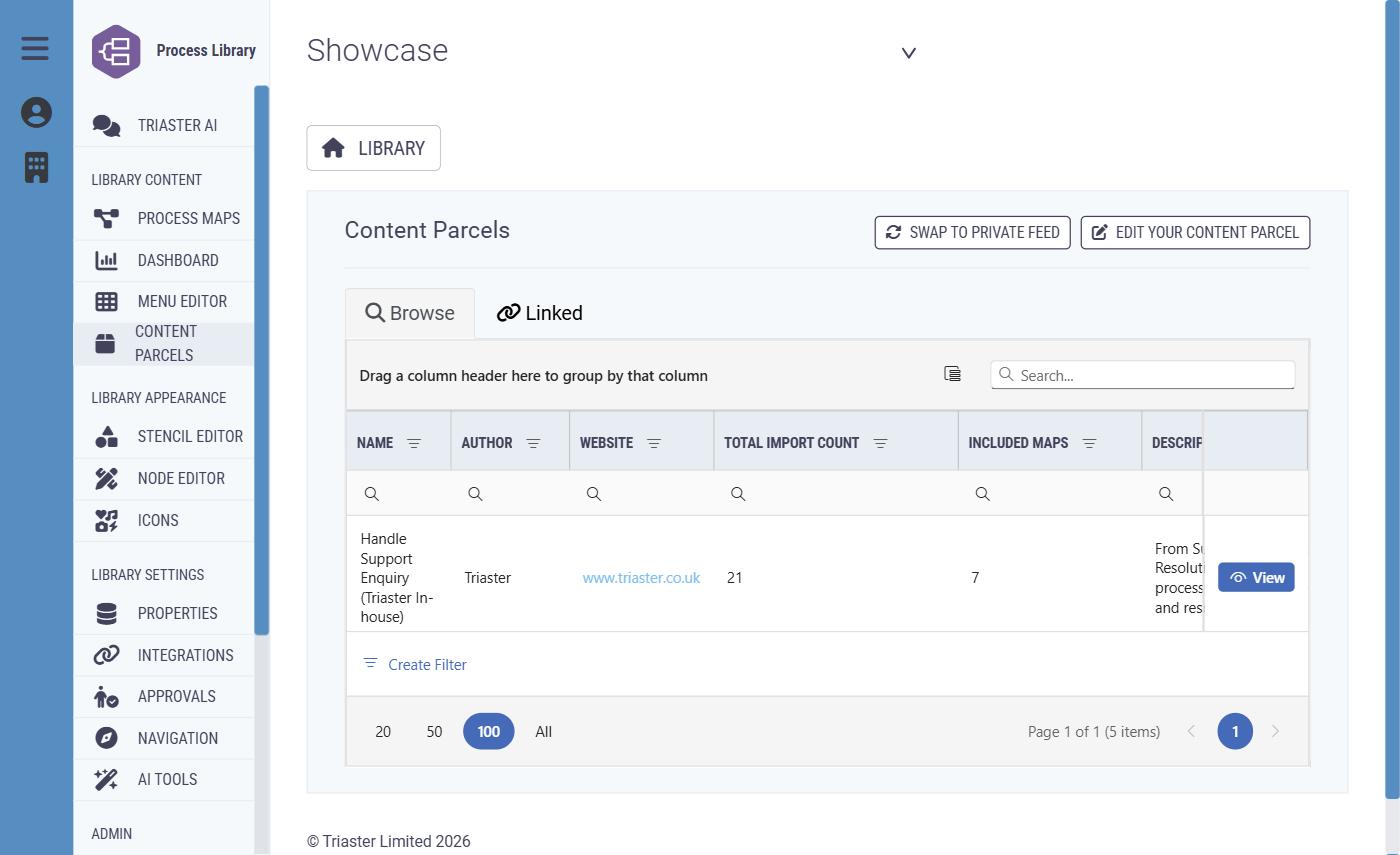
Content Parcels
Publish reusable process content once and distribute it to other libraries, with author matching, translation and a live link to future updates.
Explore Content Parcels →Capture
Build the map of how work is actually done, in the browser, with the detail that makes it usable afterwards.
Create a process
Start a new process with a name and a place in the library, from a blank map, from an existing process or draft, or from a template.
The map editor
Add and arrange shapes, connect steps, change labels and remove items. Shapes come from your library's stencil, and tools centre the map, check spelling and check the map for issues.
Work in a draft
A draft is a working version. Authors change it, name it, describe what has changed and move it in the library without touching the published map.
Details on every step
Record information about the process as a whole and about each activity or deliverable: free text, dates, choices from prepared lists and any other fields your organisation has set up.
Links out to the next thing
A step can point to another process, a document or a website, so readers move straight from the high level to the detail they need.
Reuse and bulk change
Create a new draft from a published process, export process information to Excel, import supported changes, or find and replace across several maps.
AI-assisted first drafts
Where AI is enabled, an author can supply instructions and a source file to produce a first draft for them to inspect and refine.
More on Triaster AI →Personal work queues
The Processes area gathers an author's drafts and tasks in one place, with searching, sorting, filtering and chosen columns.
Findability
Search that understands processes, not just filenames.
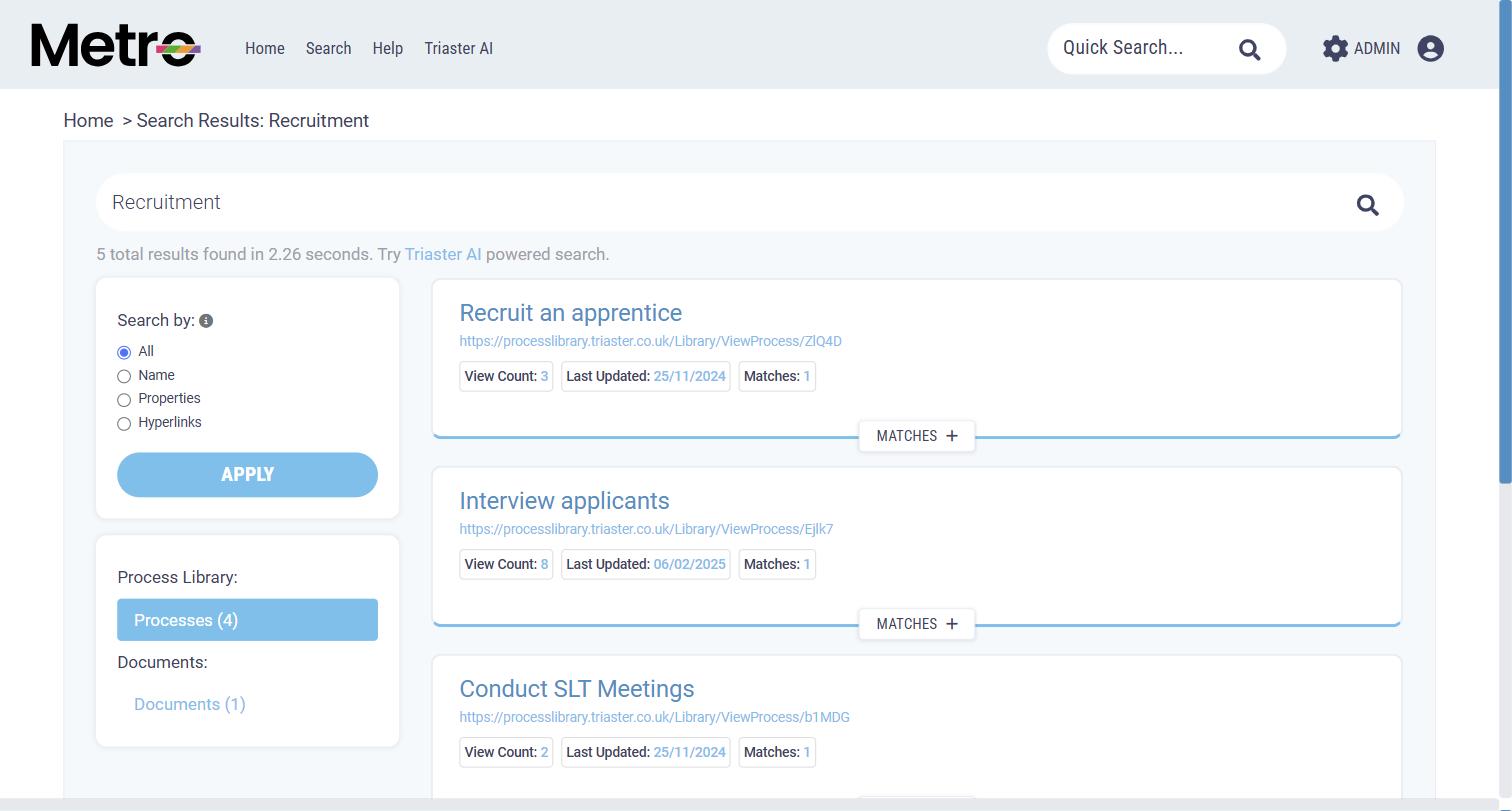
People do not fail to follow a process because they disagree with it. They fail because they could not find it. Search covers process maps, the information recorded on those maps, menu pages and documents, and takes the reader straight to the relevant page or file.
A quick search box sits in the library header for everyday lookups, and your organisation chooses which additional process information is included in it. Where Search by Role is used, a reader can find every process a job role touches and see whether that role is responsible, accountable, consulted or informed. Where SharePoint search is connected, its documents appear alongside process content, and the current approved version of a controlled document appears in search as its details page rather than as an unexplained file copy.
Hierarchy navigation
From a branded home screen to a governed process, in three clicks.
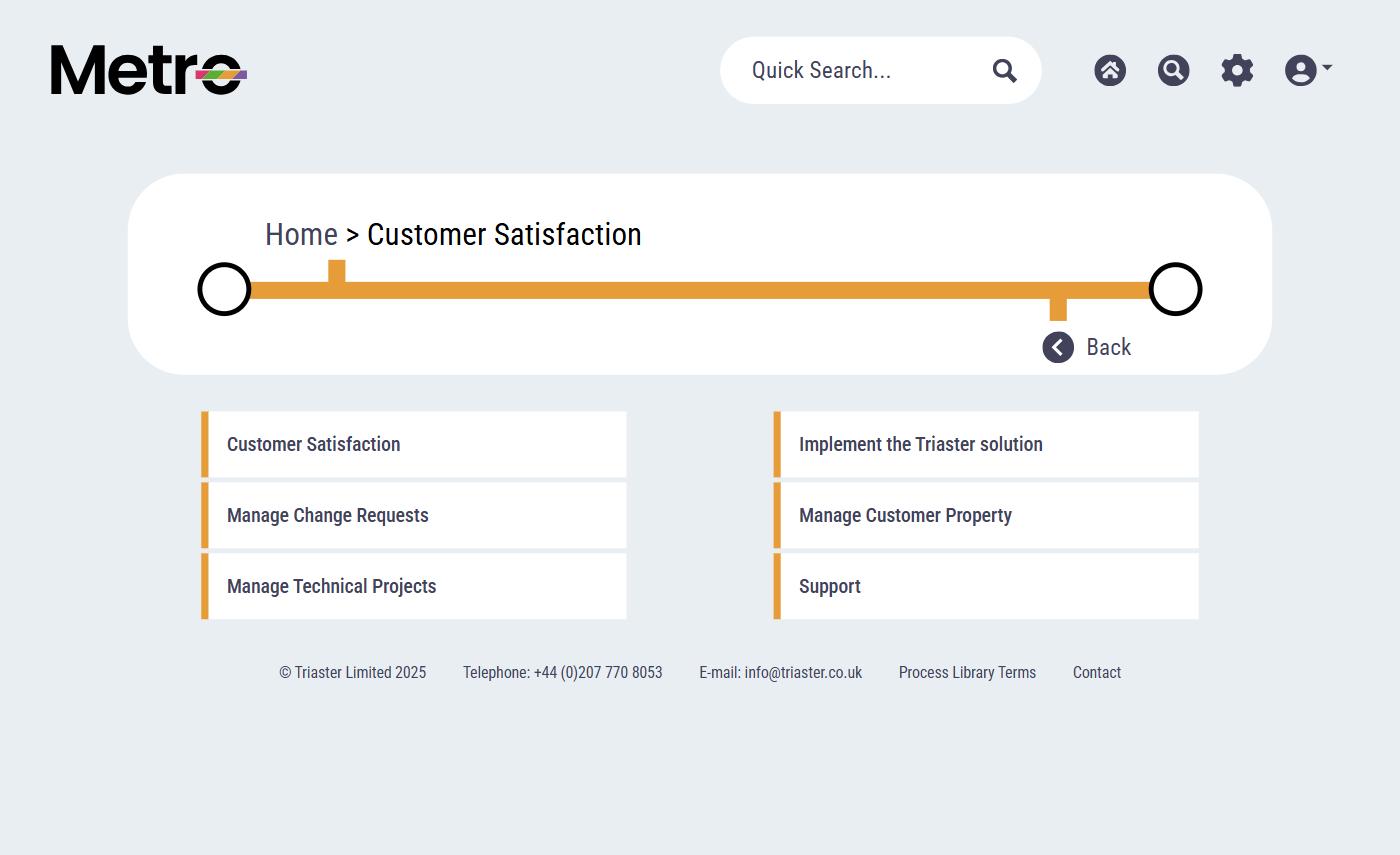
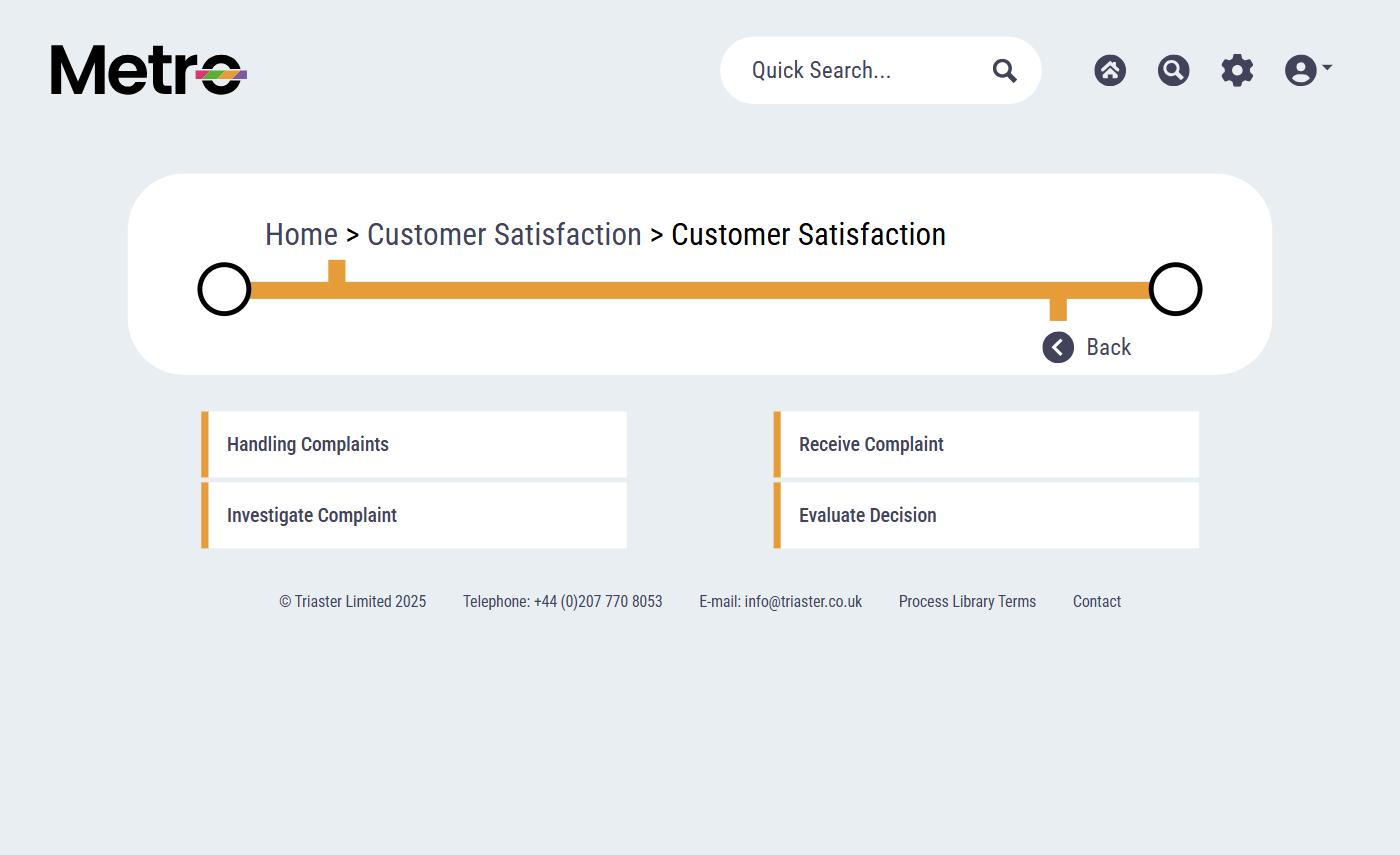
A library home page is arranged around the topics, departments or categories that make sense to your organisation. Menus lead to further menus, to process maps, to documents, to useful websites, or to pages designed specifically for you. The trail near the top of every page shows exactly where the reader is and how to get back.
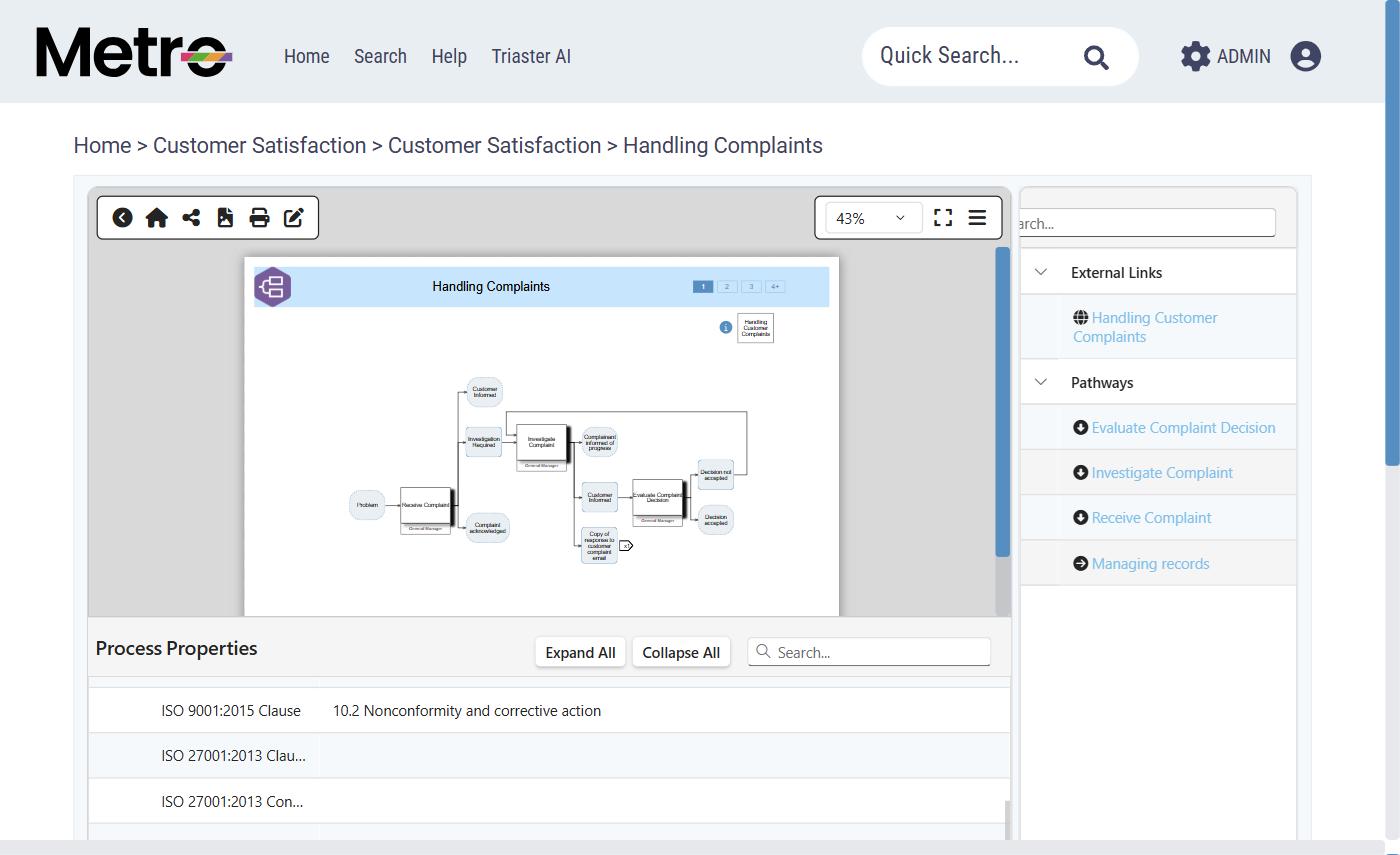
Navigation is not only vertical.
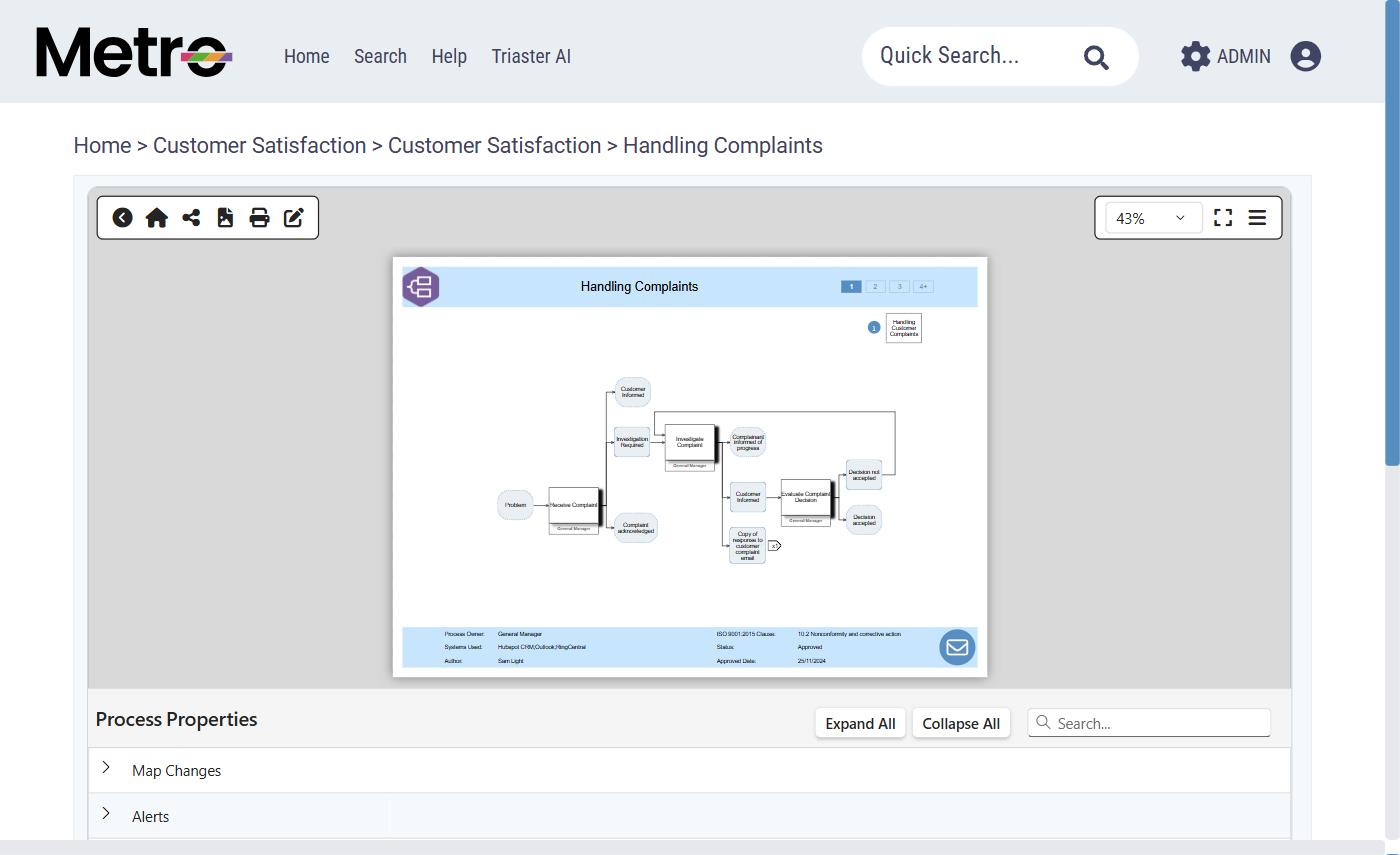
Maps link to one another wherever work continues in another process, and your organisation can present those relationships as pathways. A reader following a complaint does not have to climb back up the menu tree to reach the investigation process, the decision review or the records process. They move sideways from inside the map they are already reading.
Process properties
Structure behind every map, not just a diagram.
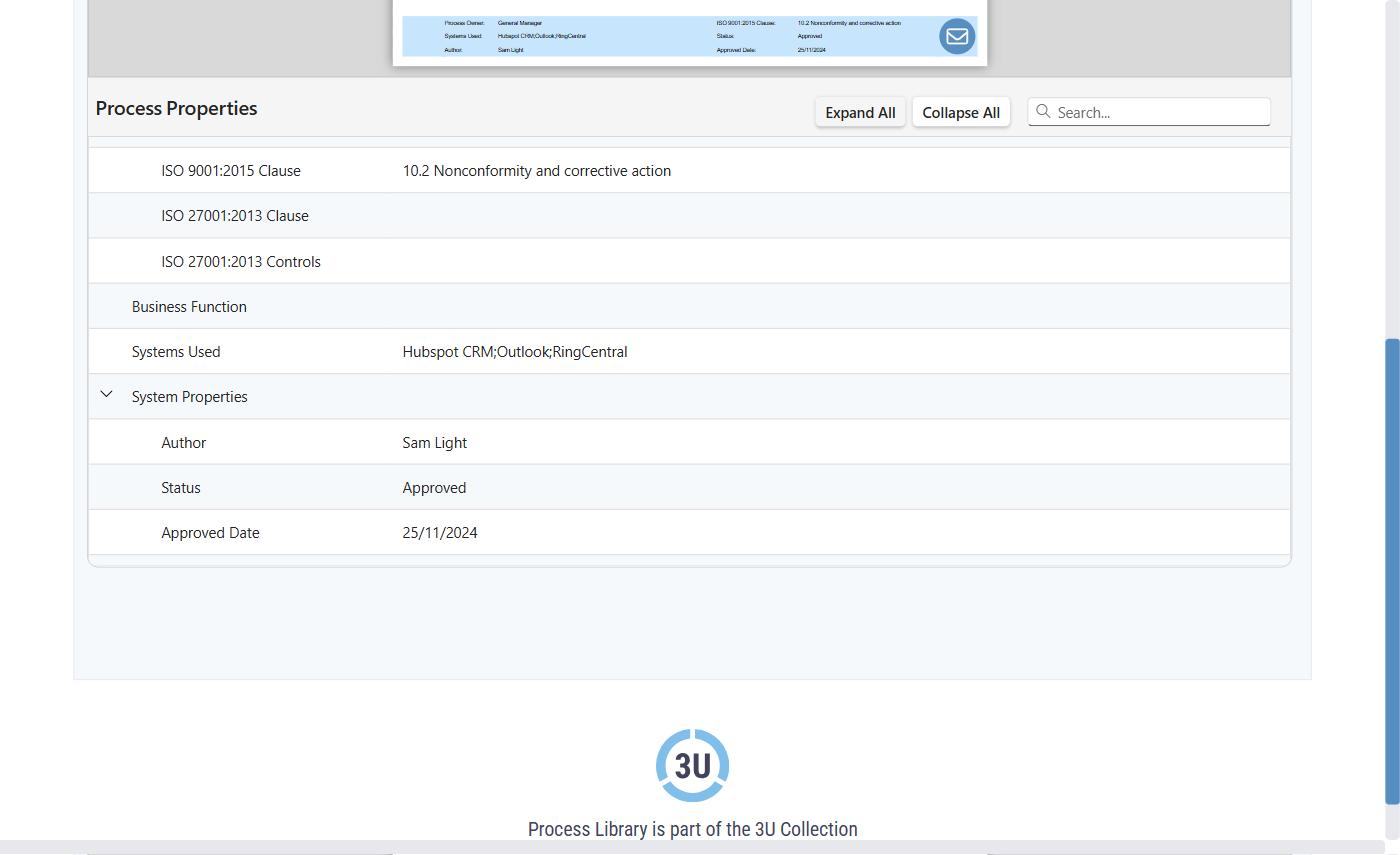
An administrator decides what information authors record about a process, an activity or a deliverable. Fields can be created and reordered, each one set to accept the kind of answer it should take, with prepared lists of answers where consistency matters. One field can be made especially prominent, and selected fields can be included in quick search.
That is what turns a picture into an audit-relevant record: standard clause references, business function, the systems a step depends on, and the author, status and approved date held alongside them.
Bespoke design
Your library, designed around your organisation.
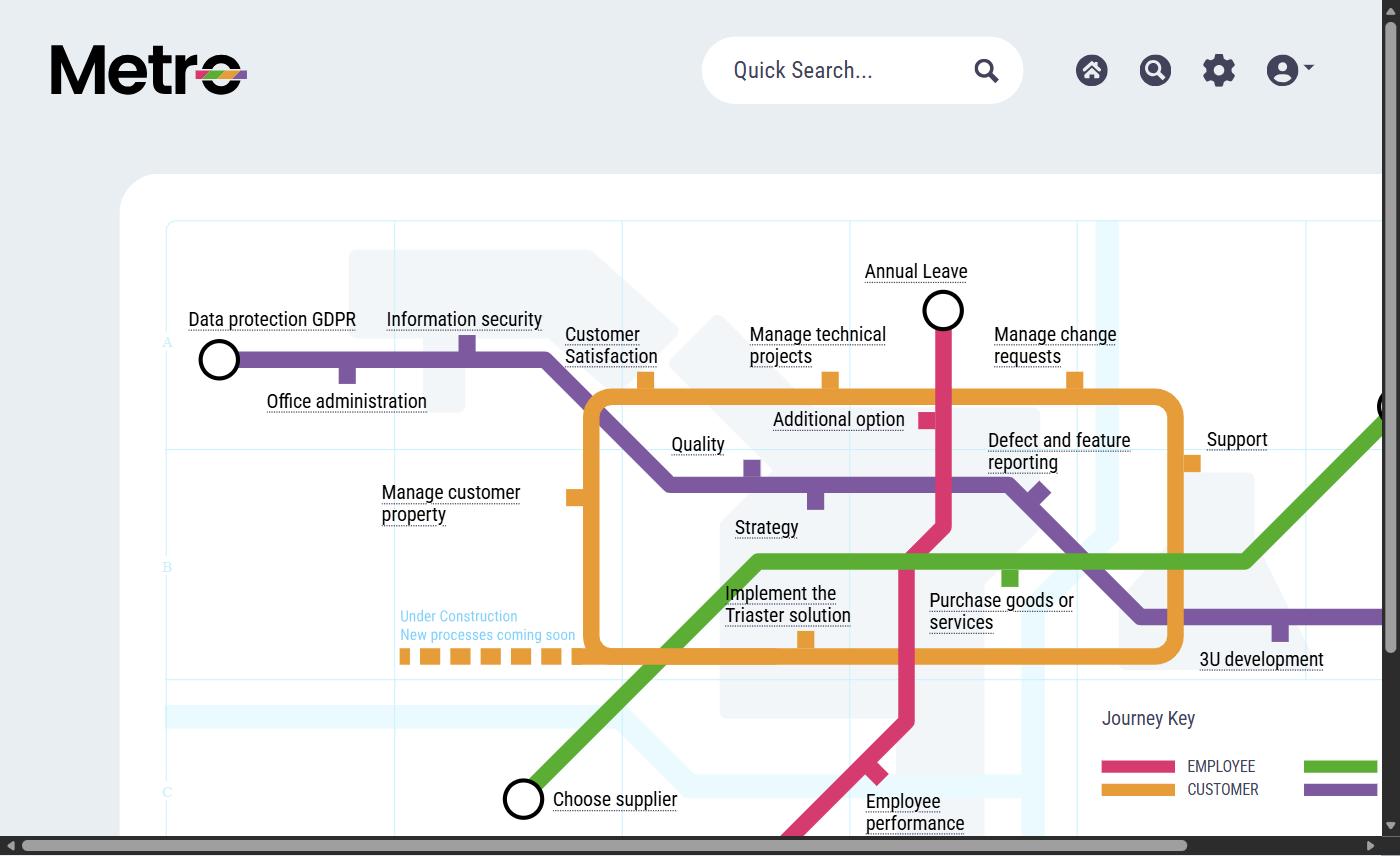
A QMS does not have to look like software. Colours, icons, images and the rest of the design material are tailored to your organisation, the Menu Editor builds the home page structure around your own terminology, and further design tools allow more extensive changes to how the published library looks.
The example here is a real, live library home page built as a tube map: colour-coded journey lines for Employee, Customer, Supplier and Project, with station-style entry points into named processes. People find their way in by the journey they are on rather than by guessing a folder name.
See around two dozen real client designs including Cabot, Skanska, The AA, Sir Robert McAlpine and Microsoft.
Administration and access
The library is yours to configure.
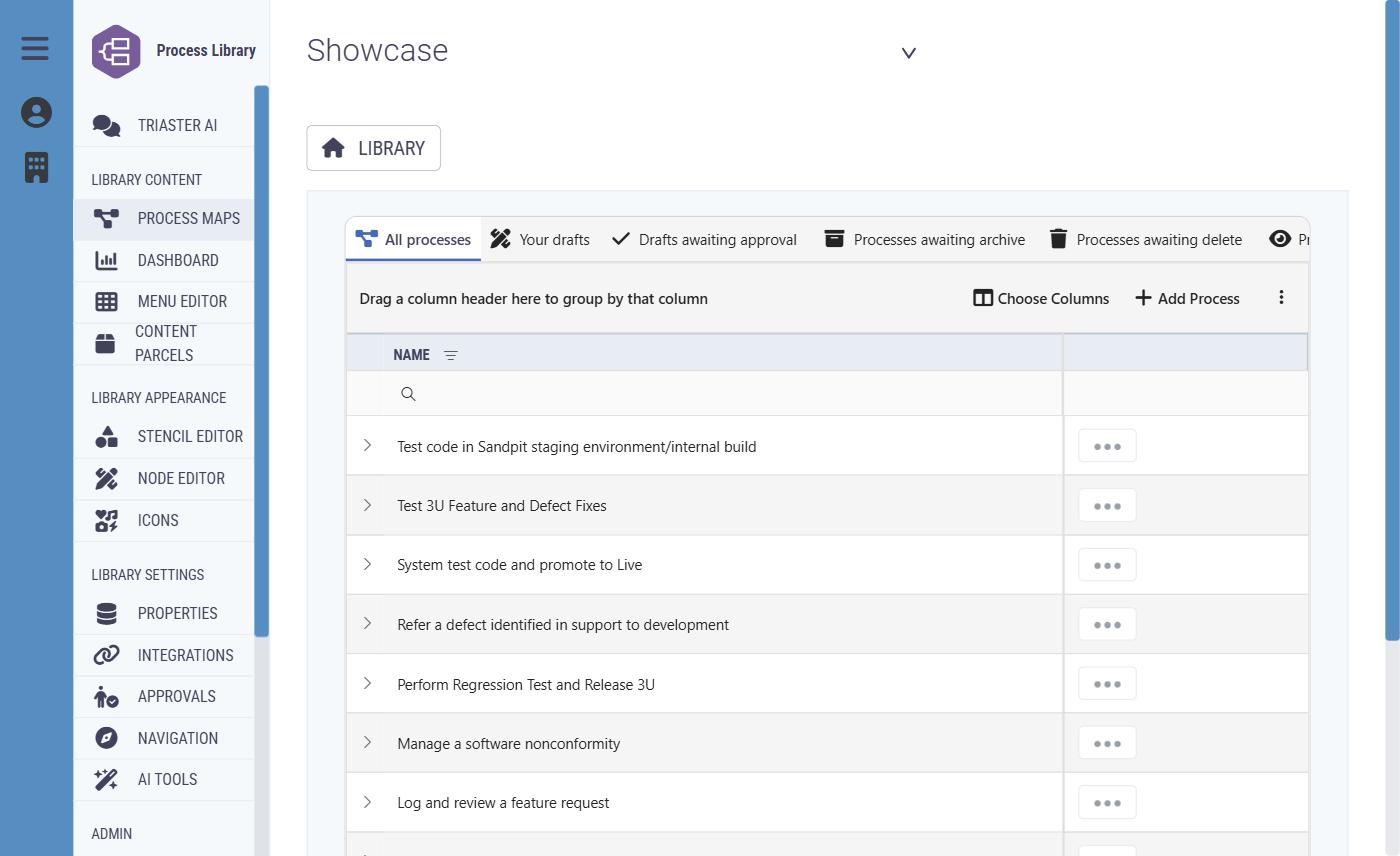
Administrators own the structure, not a vendor ticket queue. The Menu Editor builds and reorders the home page. Navigation settings control library links and how pathways appear. Stencils define the shapes authors draw with, nodes organise processes and carry graphics or watermarks, and properties and answer sets define what gets recorded.
- Roles and Users: invite people, manage accounts, create roles, and decide which features each role can use.
- Additional access rules for protected processes, individual registers, and document authors and approvers.
- Library switching for people who belong to more than one library, each with its own content, settings and access rules.
- Subscription and payment information where billing is managed in the product, with a warning when required licences are missing.
Full feature reference
Every feature, in one place.
Capture
8 featuresBuild the map of how work is actually done, in the browser, with the detail that makes it usable afterwards.
- Create a process
- Start a new process with a name and a place in the library, from a blank map, from an existing process or draft, or from a template.
- The map editor
- Add and arrange shapes, connect steps, change labels and remove items. Shapes come from your library's stencil, and tools centre the map, check spelling and check the map for issues.
- Work in a draft
- A draft is a working version. Authors change it, name it, describe what has changed and move it in the library without touching the published map.
- Details on every step
- Record information about the process as a whole and about each activity or deliverable: free text, dates, choices from prepared lists and any other fields your organisation has set up.
- Links out to the next thing
- A step can point to another process, a document or a website, so readers move straight from the high level to the detail they need.
- Reuse and bulk change
- Create a new draft from a published process, export process information to Excel, import supported changes, or find and replace across several maps.
- AI-assisted first drafts
- Where AI is enabled, an author can supply instructions and a source file to produce a first draft for them to inspect and refine.
- Personal work queues
- The Processes area gathers an author's drafts and tasks in one place, with searching, sorting, filtering and chosen columns.
Govern
10 featuresNothing becomes the published version without a decision, and every decision stays on the record.
- Submit for approval
- When a draft is ready the author submits it to the people who must approve it. The draft locks for the approval, and the author explains the change so the decision is easy to understand.
- Approve or send back
- Approvers inspect the map and either approve it or return it with feedback. Once every required approval is in, the approved version becomes the published map.
- Reviews of published processes
- Where reviews are enabled, a reviewer confirms a published process still looks right or marks it as needing work. Completed reviews are recorded and the next one can be scheduled.
- See what needs attention
- Lists of drafts awaiting approval, processes awaiting review and work awaiting rework, by role. Administrators can see work across the library, or act for an assigned approver where permitted.
- Reminders
- The library sends reminders about approvals and upcoming or overdue reviews, so work is less likely to be forgotten.
- Restricted processes
- Where a map holds information meant only for certain roles, an authorised person sets the restriction. A direct link does not get anyone past it.
- Archive, delete, restore
- Archiving and deletion can require a request and an approval, with a stated reason. Archived processes and eligible drafts can be restored or recovered by authorised users.
- History and previous versions
- Earlier approved versions stay in the process history, so people can see how a process has changed over time.
- Controlled documents
- Beyond the ordinary document library, controlled documents add references, formal versions, named approvers, check out and revise, a record of what changed, and obsolete, archive and restore.
- Registers for risks and controls
- Where the Registers module is enabled, risks, controls, actions and reviews are governed with owners, approval routes and an audit trail, linked to the processes they concern.
Share
11 featuresOne library everyone reads, where the version on screen is the version that was approved.
- Search the library
- Search across process maps, the information recorded on maps, menu pages and documents, and land on the relevant page or file.
- Quick search
- A search box in the library header finds content without opening the full search page, including the process information your organisation chooses to index.
- Search by Role
- Where used, Search by Role finds the processes a job role touches, and whether that role is responsible, accountable, consulted or informed.
- Read a published map
- Follow the steps, read the information attached to the process and to each activity, and use the links to related processes, documents and websites.
- Related processes and pathways
- Maps link to one another where work continues elsewhere, and pathways can be presented to make those relationships easy to follow.
- My Processes
- A personal route into the processes that are relevant to the person signed in.
- Share a link
- Send a link to a process. The person opening it still needs the appropriate library access.
- Draft previews and older versions
- Authors and approvers preview a draft before publication, and people with the right access can open older approved versions. A preview is never what ordinary readers see.
- Documents and SharePoint
- Connected document storage gives browsable folders and files, and where SharePoint search is connected its documents appear alongside process content.
- Translation
- Where Phrasebook is connected, administrators set the library language and send content for translation.
- Content Parcels
- Share reusable process content from one library to another, with author matching and a link back to future updates from the source.
Improve
7 featuresSee how the library is really being used, keep it current, and use that evidence to make the work better.
- Dashboards
- Where enabled, users build and arrange dashboards from cards: active users, frequently viewed processes, process visits over time, external website links used from the library, process counts, deliverables that do not match as expected, and chosen process work lists.
- Explore the detail behind a number
- Some cards open the records behind a figure or chart, and a process-list card takes you straight to the matching list in the Processes area.
- Review cycles
- Scheduled reviews, recorded outcomes and reminders keep the published library honest rather than letting it quietly age.
- Ask the library questions
- Where Triaster AI is enabled, people ask questions of the library, explore a particular process, and surface matters worth checking in a governance review.
- Actions that get closed
- In Registers, actions carry an owner and a due date, are linked to a record or control, and are reminded on until they are completed or cancelled.
- Google Analytics
- Connect Google Analytics to understand how the published library is being used.
- Power BI and reports
- Authorised people connect reporting tools to QMS information and report on processes, approvals, reviews, people and other library data. Ready-made report options may also be available.
What you see in your own library depends on your organisation's setup and your access. Triaster AI, Dashboards and Registers are enabled per organisation and per user rather than switched on for everyone by default, and connections such as document storage, SharePoint search, translation, Google Analytics and reporting depend on what has been set up. Ask us what your plan includes, or check the pricing page.
The structural difference
Document-centric QMS vs Process Approach QMS.
| Dimension | Document-centric QMS | Triaster (Process Approach) |
|---|---|---|
| Unit of organisation | The file: procedures, work instructions, forms. | The process: activities with owners and handovers. |
| Structure | A folder tree of documents. | A connected model of how work moves. |
| Ownership | Hidden in file properties, if it exists. | A named owner on every process. |
| Version control | Managed per file, drifts across shared drives. | Managed against the model, one current version everywhere. |
| Findability | Search by filename or keyword. | Search by process, role, activity or recorded property. |
| Change management | Edit the file, hope people find it. | Approval route, change description, full history. |
| ISO 9001 alignment | Documents mapped to clauses after the fact. | Built on Clause 4.4, the Process Approach, by design. |
See these features against your organisation.
A free executive briefing, or a short call with a senior consultant. Either way we start from the way your organisation actually runs.